Helios Rust Console Bot Documentation
Battle Pass Feed
Choose Discord level-up channels and customize the in-game Battle Pass message.
- Last reviewed
- Maintained by
- Helios RCE
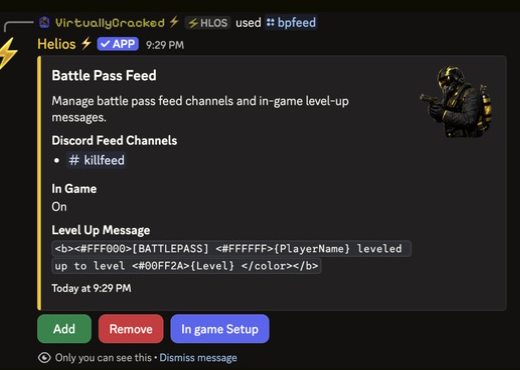
Battle Pass Feed
Overview
/bpfeed opens the staff settings panel for Battle Pass level-ups. Choose the Discord channels that receive level-up posts, and separately turn the in-game message on or off. Settings are shared by this Discord community, not limited to the channel where you run the command.
This is different from the announcement channel for a temporary XP event. Selecting an XP-event channel does not also set up level-up posts.
Set the in-game message in the dashboard
- Open Manage Server → Battle Pass.
- Expand In-Game Level-Up Announcements.
- Choose On or Off under Announcements.
- Enter the Message, then choose Save Announcements.
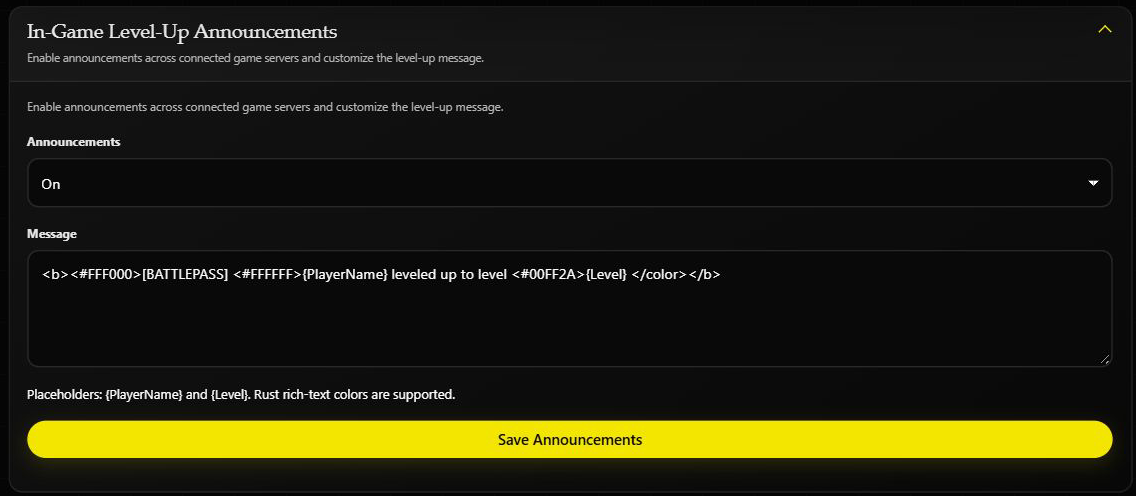
This screenshot shows existing settings. Opening the section does not save a change or send a test message.
Keep {PlayerName} and {Level} exactly as written if you want Helios to fill in the player's name and new level. A simple message is:
{PlayerName} reached Battle Pass level {Level}!
You do not need to use color formatting. The in-game message is separate from the Discord embed; changing this text does not rewrite Discord level-up posts.
Setup Flow
- Run
/bpfeedto open the panel. - Click Add, then select one Discord text or announcement channel. The selection saves immediately—there is no second confirmation. Repeat to add another channel.
- Click In game Setup to open the form. Enter On or Off, edit the message, and submit to save. Close the form without submitting if you only want to inspect it.
- To stop Discord posts in one channel, click Remove, then select that feed destination. The selection removes it immediately; it does not delete the Discord channel or its old messages.
Panel Buttons
| Button | What It Does |
|---|---|
| Add | Add a Discord battle pass feed channel |
| Remove | Remove a battle pass feed channel |
| In game Setup | Toggle the in-game feed and edit the level-up message |
Example
/bpfeed
Notes
- The panel shows your current feed channels, whether the in-game feed is on, and the current level-up message.
- Requires Manage Server (ManageGuild).
- Controls belong to the person who opened the panel. Another staff member should run their own
/bpfeed. - Discord feed posts happen when the player's level increases, not for every kill or every XP gain. Choosing Off for the in-game message does not turn off the Discord feed.
- If Discord posts are missing, check the destination and Helios's channel permissions. If in-game posts are missing, check Announcements, the message, and the game-server connection. Do not repeatedly change XP or grant rewards just to test the feed on a live server.