Helios Rust Console Bot Documentation
/orp list
Check a base's ORP leader, members, status, and timers before changing its protection.
- Last reviewed
- Maintained by
- Helios RCE
Use /orp list server:"<SERVER>" to review the saved Offline Protection zones on one game server. This is a staff lookup; it does not create, remove, or activate protection.
/orp list server:"<SERVER>"
Read the result
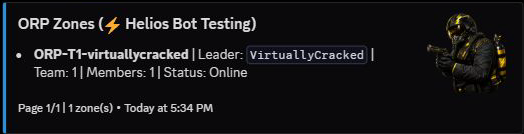
Check the game server in the title, then the zone name, leader, team or clan, members, and status. Longer lists have page controls. Activation or expiration information appears when it applies.
| Status | What it tells you |
|---|---|
| Online | At least one tracked member is online. The base is not receiving offline protection. |
| Pending | The tracked group is offline, but the activation delay has not finished. |
| Protected | Offline protection is active. Check any remaining protection time. |
The screenshot shows a real Online zone. It does not demonstrate Pending or Protected behavior. Run the command again for a new snapshot; an old message does not update continuously.
Find more detail for a player
Run /player info user:@Player and choose ORP Info to see matching zones across the Discord community, member names, timestamps, and any previous removal. Check the server named in each record. See the player lookup guide for how to read that history.
On the dashboard, open Offline Protection → Active ORP Zones for the selected game server. Review the leader, members, status, and timers before removing anything.
If protection looks wrong
- Still Pending: wait for the configured activation delay and check whether a tracked member has returned.
- Still Online: check the tracked member list. Changing a zone color does not make the group offline.
- Missing from the list: confirm the selected server, then inspect the player's ORP history before asking them to create another zone.
- A saved setting is not reflected: read the ORP save result and use Retry Zone Updates if it could not confirm all live updates.
Staff need access to the ORP command through their admin permissions or an allowed moderator role. See Offline Protection for setup, access rules, and troubleshooting.