Helios Rust Console Bot Documentation
/player info
Look up player link status, balance history, and linked-user matches.
- Last updated
- Maintained by
- Helios RCE
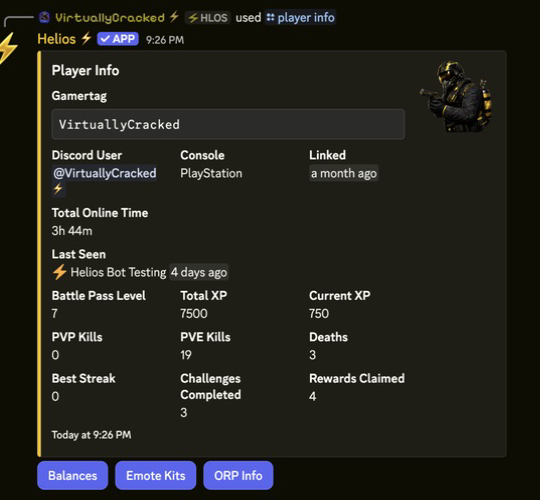
/player info
Use the player lookup commands when you need to confirm who is linked, inspect a user's history, or check whether a gamertag belongs to the correct Discord account.
This page is most useful before or after running /player link or /player unlink.
Commands
| Command | What It Does |
|---|---|
/player info user:@User | View profile info and open Balances, Emote Kits, or ORP Info |
/player logs user:@User | View a user's balance logs and adjustment history |
/player search gamertag: | Find the Discord user linked to a gamertag |
Common Uses
- Confirm a player linked successfully
- Check which Discord user owns a gamertag
- Review money or adjustment history before staff action
- Verify the correct target before unlinking or editing access
Example
/player info user:@User
/player logs user:@User
/player search gamertag:"<NAME>"
Player Info Buttons
- Balances shows the player's balance-change history with pagination.
- Emote Kits shows only claimable kit binds for the selected player. Helios filters by enabled server, required auth group, required Discord role, and current player/server cooldowns.
- ORP Info finds every ORP in the guild where the linked gamertag is a leader or member. It shows status, team, members, activation, protection, expiration, last-online, created, and updated timestamps.
The buttons use the same staff permission checks as the original /player info response.
Best Practice
If staff are about to unlink a player or change a role-gated system, run a lookup first so you do not remove or edit the wrong account.