Helios Rust Console Bot Documentation
TP To Friend
Set up TP To Friend in Helios so players can request a teleport to an online teammate, with delay, cooldown, and role controls.
- Last reviewed
- Maintained by
- Helios RCE
TP To Friend
Overview
Let players teleport to an online friend on your server. The player runs a Discord command, the friend accepts in-game with a Yes/No quick chat, and Helios teleports them after your configured delay. Premium only.
Configure it on the dashboard
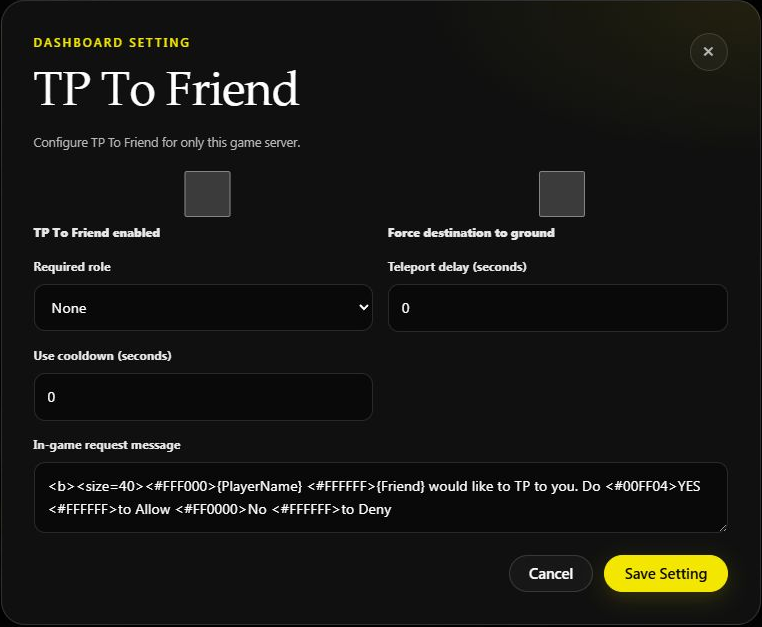
Open Manage Server → Overview, scroll to Game server settings, find TP To Friend, and choose Configure.
- Choose whether friend teleporting is enabled.
- Set Delay and Cooldown, in seconds.
- Choose a Required Role if access should be limited.
- Enable Force destination to ground if the destination should be grounded.
- Save, then test a request with two linked, online players.
Example: a 10-second delay and 300-second cooldown means the accepted teleport waits 10 seconds, with a five-minute wait between requests.
If Combat Lock blocks friend teleports, a combat-locked player must wait for that lock to clear. The destination player still has to accept; having the required role does not skip consent.
Commands Covered
| Command | Who | What It Does |
|---|---|---|
/tp-to-friend server:<server> gamertag:<player> | Player | Request a teleport to an online friend |
/set tp-to-friend server:<server> | Admin | Open the TP To Friend settings panel |
How It Works
- A player runs
/tp-to-friendand picks the online friend they want to teleport to. - Helios asks that friend in-game to accept. The friend answers with the Yes/No quick chat.
- On accept, the player teleports after the Delay you set.
- The request stays open for 60 seconds (the prompt repeats every 10 seconds) before it expires.
Panel Settings
Open the panel with /set tp-to-friend server:<server>. The dashboard offers the same settings:
| Setting | What It Does |
|---|---|
| Status | Turn TP To Friend ON or OFF for the server |
| Required Role | Restrict the feature to players with a linked Discord role |
| Force On Ground | Require the player to be on the ground before teleporting |
| Delay | Seconds to wait before the teleport happens |
| Cooldown | Seconds a player must wait between requests |
Quick Discord setup
- Run
/set tp-to-friendand select the game server. - Turn the feature on, then choose the optional Discord role.
- Open Settings to set the delay and cooldown.
- Keep Force On Ground on if you only want teleports to start when the requesting player is standing safely on the ground.
- Test with two linked players who are online. The receiving player must still accept in Rust with the Yes/No quick chat.
Example
/set tp-to-friend server:"EU Main"
/tp-to-friend server:"EU Main" gamertag:BuddyGT
Notes
- Premium only. The setup panel requires Manage Server.
- The friend must be online and accept in-game for the teleport to happen.
- Use Cooldown to stop players spamming teleport requests.