Helios Rust Console Bot Documentation
Scheduled Raid Protection (SRP) & ORP Schedules
Admin reference for /settings srp, /orp timers, and /orp scheduled-zorp in Helios — weekly raiding hours, ORP creation blocks, and scheduled ZORP pauses.
- Last reviewed
- Maintained by
- Helios RCE
Overview
Scheduled Raid Protection lets you run raiding on a weekly schedule. Outside your raiding hours, Helios turns building damage off server-wide, so bases can only be raided during the window you set. You can also schedule when new ORP zones can be created and schedule full ORP pauses (ZORP windows). Premium only.
Commands Covered
| Command | What It Does |
|---|---|
/settings srp | Set weekly raiding hours for a server |
/orp scheduled-raids-remove | Remove saved raiding hours and restore normal raiding |
/orp timers | Block new ORP creation during a weekly window |
/orp scheduled-zorp | Schedule a weekly ORP pause, with optional zone wipes |
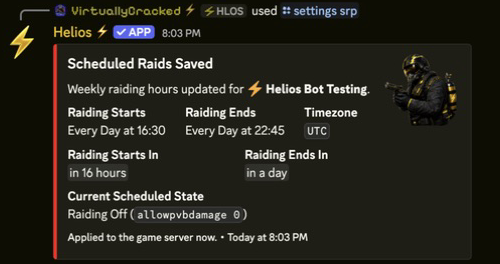
Set Raiding Hours With /settings srp
/settings srp server:"US Main" raiding_starts:"Friday" start_time:16:30 raiding_ends:"Sunday" end_time:22:45 timezone:"America/New_York"
| Option | What It Does |
|---|---|
server | Premium server to schedule |
raiding_starts | Day raiding starts (pick a weekday or Every Day) |
start_time | Start time in 24-hour HH:MM format |
raiding_ends | Day raiding ends |
end_time | End time in 24-hour HH:MM format |
timezone | Timezone the times are in (autocomplete) |
- During raiding hours, building damage is on (
allowpvbdamage 1). Outside them, it's off (allowpvbdamage 0). - The schedule repeats every week and is re-applied automatically, including after the server reconnects.
- Pick
Every Dayto run the same raiding window daily. - Running
/settings srpagain replaces the saved schedule for that server.
Remove Raiding Hours
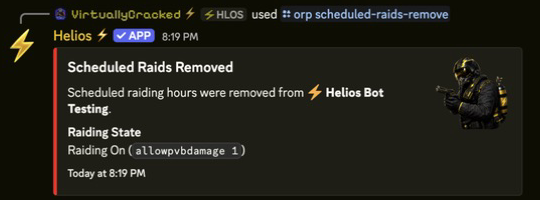
/orp scheduled-raids-remove server:"US Main" srp:<schedule>
Pick the active schedule from the autocomplete. Removing it restores normal raiding (building damage stays on).
Block New ORPs With /orp timers
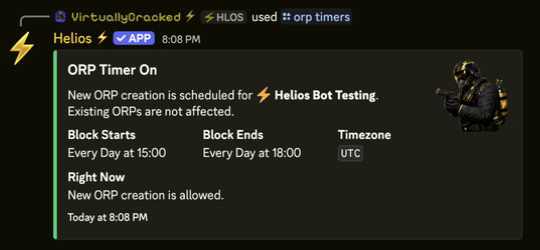
Pause new ORP zone creation during a weekly window — existing ORP zones keep working.
/orp timers server:"US Main" toggle:On block_start:"Friday" start_time:14:50 block_end:"Sunday" end_time:22:45 timezone:"America/New_York"
toggle:On/toggle:Offturns the saved timer on or off — you only need the window options when saving a new one.- Players who try to create an ORP during the block are denied until the window ends.
Schedule ORP Pauses With /orp scheduled-zorp
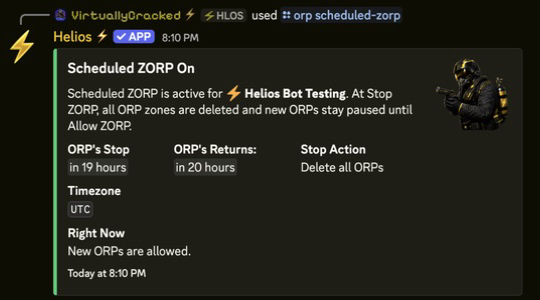
Schedule a weekly window where ORP is paused and new ORPs cannot be created. Choose whether existing zones are deleted or temporarily disabled. These are different outcomes; a temporary pause does not have to delete players' zones.
/orp scheduled-zorp server:"US Main" toggle:On block_zorp:"Friday" stop_zorp_time:15:45 allow_zorp:"Sunday" start_zorp_time:18:30 timezone:"America/New_York" wipe_zorp:True
| Option | What It Does |
|---|---|
toggle | Turn the saved ZORP window on or off |
block_zorp | Day the pause starts |
stop_zorp_time | Pause start in 24-hour HH:MM |
allow_zorp | Day new ORPs are allowed again |
start_zorp_time | Pause end in 24-hour HH:MM |
timezone | Timezone the times are in |
wipe_zorp | True deletes ORP zones at stop time; False disables them and restores them at the allow time |
Choose this option carefully: a new schedule defaults to wipe_zorp:True if you leave it out. Deleted zones do not come back at the end of the window; players need to create new ones. Use wipe_zorp:False explicitly when you want to keep the zones and restore them after the pause.
To create or replace the window, provide all five schedule fields: block_zorp, stop_zorp_time, allow_zorp, start_zorp_time, and timezone. To turn the existing saved schedule back on, use toggle:On with those fields and wipe_zorp left blank.
To turn the saved schedule off:
/orp scheduled-zorp server:"US Main" toggle:Off
Leave the schedule fields blank when turning it off. Zones that were temporarily disabled are restored when the change reaches the connected server; zones that were deleted cannot be restored by turning the schedule off.
Saving or enabling a window that is already in progress can apply its pause immediately. Do not create a delete-mode schedule as a harmless preview on a live server.
Notes
- All three schedules are per server, timezone-aware, and repeat weekly.
- Times use 24-hour
HH:MMformat (for example16:30,22:45). - Requires Manage Server (ManageGuild) and a premium server.
- Pair SRP with /orp settings for full offline-raid coverage.