Helios Rust Console Bot Documentation
Rust Console Zones: Safe Zones & PvP Arenas
Create custom zones with the Helios /zone panel: safe zones, PvP arenas, no-build areas and radiation fields, each with its own rules and boundary messages.
- Last reviewed
- Applies to
- Helios 2026.8
- Related
- /zone
- Maintained by
- Helios RCE
A zone is an area of your map with its own rules. Run /zone, stand where you
want it, capture your position, pick the rules, and it exists — a safe trading
area where PvP is off, an arena where it is on, a no-build ring around a
monument, or a radiation field nobody should linger in.
The Discord /zone panel is free; the website's zone editor requires Premium for the selected game server. Zones apply area rules to players inside them, they show up in game
as a coloured outline if you want them to, and they can announce themselves
when a player crosses the boundary.
TIPZones vs ORP zones
The zones on this page are the ones you place by hand for the whole server.
Offline raid protection zones are a separate,
premium system that players create around their own bases. /zone does not
touch ORP zones.
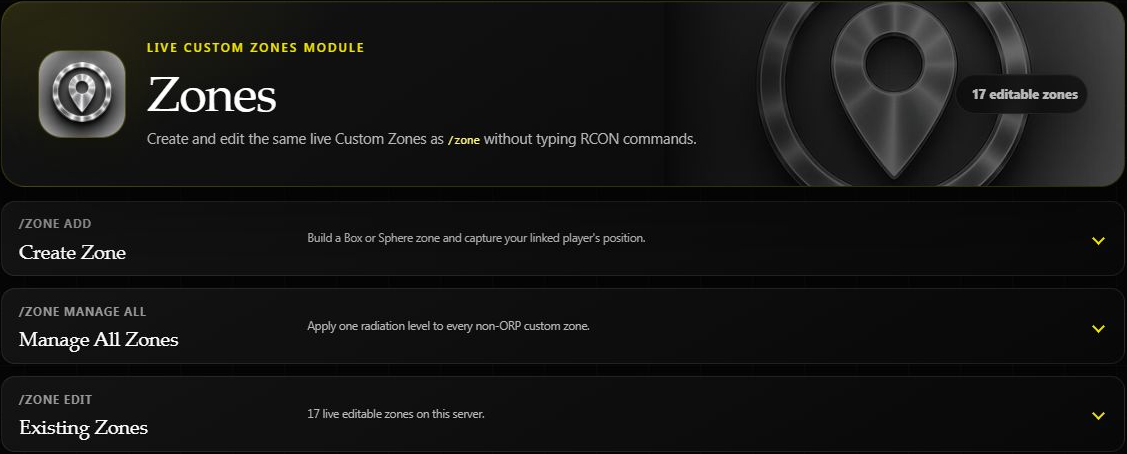
Create or edit from the dashboard
You need Manage Server in Discord and Premium on the selected game server. The Discord alternative below does not require Premium.
- Open Zones → Create Zone.
- Enter a name and choose Box or Sphere.
- Capture your linked player's position while online, or enter the coordinates.
- Set the size, rules, color, and optional boundary messages.
- Create the zone, then find it under Existing Zones.
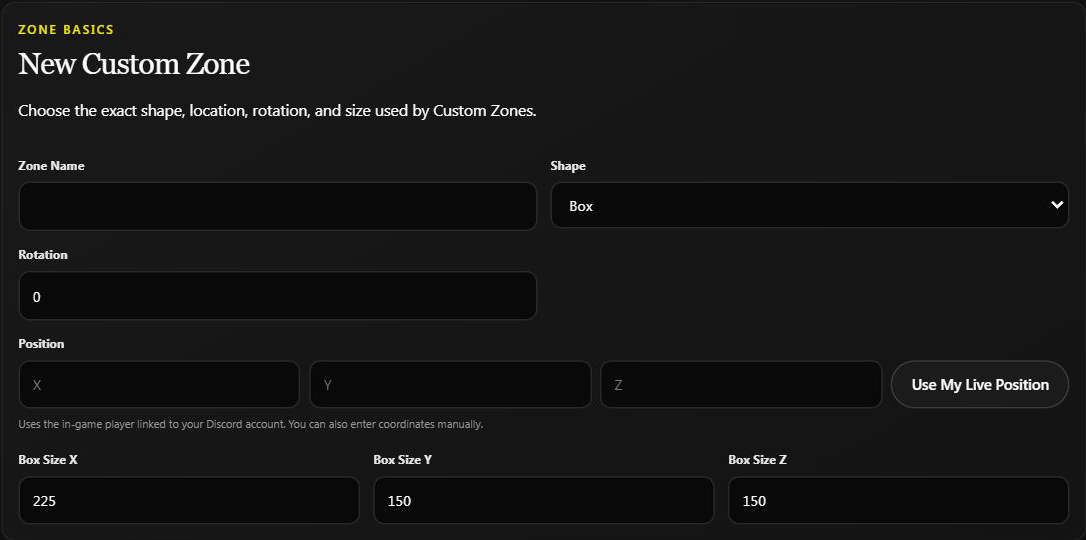
The default size is only a starting value. Box uses three size values; Sphere uses a radius and rotation 0. Check the height as well as the ground footprint. Use My Live Position requires your linked player to be online on this game server; typing coordinates does not.
For a saved zone, open Existing Zones, search by name if needed, expand its card, and click Save Zone after editing fields. The Enabled / Disabled control is different: clicking it changes the live zone immediately, without waiting for Save Zone. Refresh Live Zones reloads the current server state and replaces unsaved editor values.
If another admin changed a zone since you opened it, Helios asks you to refresh before saving again. Review the new settings rather than overwriting them from an old draft.
Example: For a trading area, turn off PvP and building damage, choose whether players may build, and enable the visible boundary. Walk across the boundary to verify the rules.
Existing Zones hides reserved ORP and automated event zones. Manage All Zones still applies radiation to every non-ORP custom zone, including automated event zones. The visible editable count is not the full bulk-change scope.
If a connection error appears after saving, refresh and inspect the zone before repeating the action: the server may already have applied it.
What People Build With Zones
| Zone | Settings that make it work |
|---|---|
| Safe trading area | Allow PvP off, Allow Building off, Building Dmg off, Show Area on |
| PvP arena or event ground | Allow PvP on, visible outline, enter message explaining the rules |
| No-build ring around a monument | Allow Building off, everything else left alone |
| Radiation deterrent | Radiation set above 0, Show Area on so it is not a nasty surprise |
| Newbie / spawn protection area | Allow PvP off, Allow Building off, enter and leave messages |
| Temporary event space | Whatever the event needs — then remove the zone afterwards |
Prerequisites
- A server connected to Helios.
- The
Manage Serverpermission in Discord —/zoneis an admin command. - You in game on that server, if you want to capture the position by standing in it rather than typing coordinates.
- Premium for the website editor, but not for the Discord
/zonepanel.
Open the Zone Panel
Run /zone, then select the server you want to manage.
/zone server:"US Main"
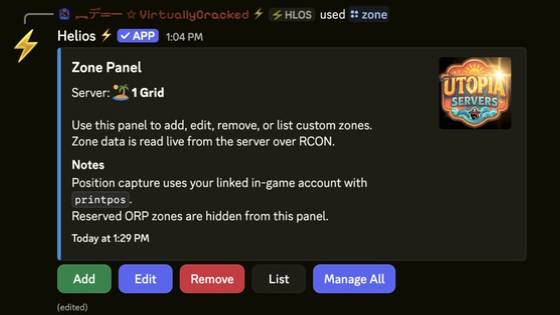
The panel lists existing zones and gives you Add, Edit, Remove, List and Manage All.
Add a Zone
Click Add on the main panel to open the zone draft and configure its position, name, shape, size, rules, color, and messages.
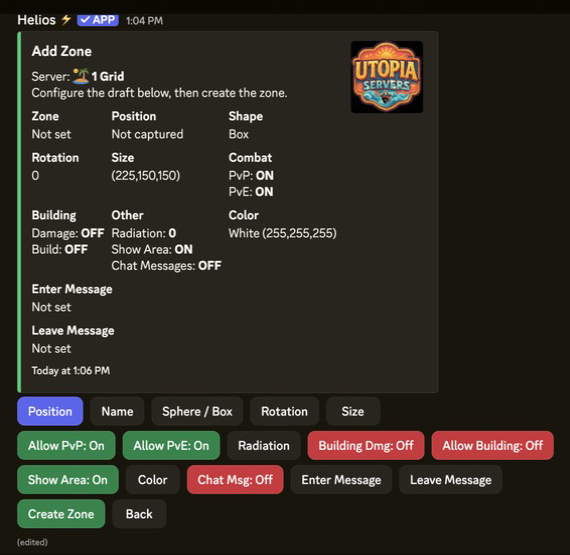
Setup Flow
- Run
/zone server:and click Add. - Stand where the zone should be and click Position to capture it (or enter coordinates manually).
- Name the zone and choose Sphere or Box, rotation, and size.
- Toggle the zone rules you want (see the table below).
- Click Create Zone.
Use Edit, Remove, and List on the same panel to manage existing zones afterwards.
Edit or rename an existing zone
In the Discord panel, choose Edit, select the zone, and change the field you need. Each submitted edit applies immediately; there is no final Save button for the whole panel. Refresh reads the current zone back from the game server.
Use Name to rename it. Pick a name that is not already used on that server. Zone names ignore capital letters, so changing only Arena to arena is not a new name.
Helios creates and checks a replacement with the new name and the current settings before removing the old zone. If the check fails, the old zone is left in place. If the message says an incomplete replacement could not be removed, refresh the zone list and review both names before trying again. Update any saved commands that still refer to the old name.
If the panel says the server did not report the current Rotation, its displayed 0 is a fallback, not a verified angle. Record or set the intended angle before a rename so the replacement uses the rotation you want.
Zone Rules
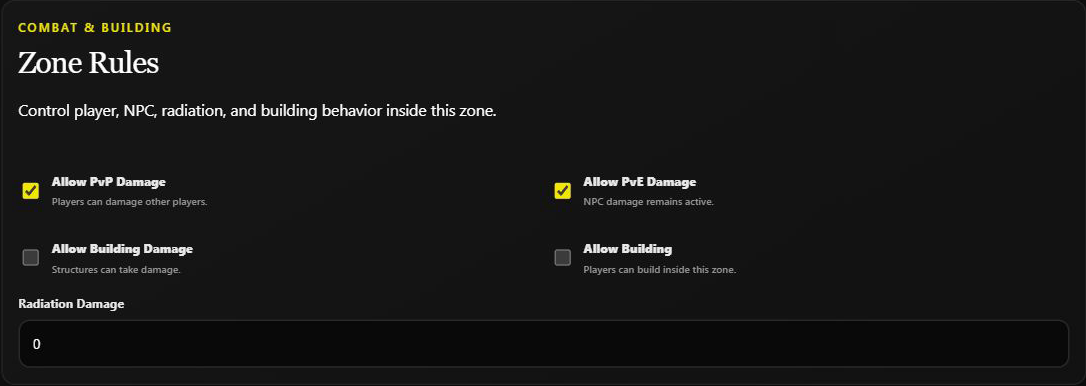
| Rule | What It Controls |
|---|---|
| Allow PvP | Player vs player damage inside the zone |
| Allow PvE | NPC damage inside the zone |
| Radiation | Radiation level inside the zone (0 for none) |
| Building Dmg | Whether buildings can take damage |
| Allow Building | Whether players can build inside the zone |
| Show Area | Draw the zone outline in game |
| Color | Zone outline color |
| Chat Msg | Announce when players enter/leave |
| Enter / Leave Message | Custom messages shown on entry and exit |
Allow Building and Building Dmg are separate. Turning building off does not prevent damage to existing structures. A zone is not a Discord-role entry lock: naming it "Staff Only" does not stop other players from entering.
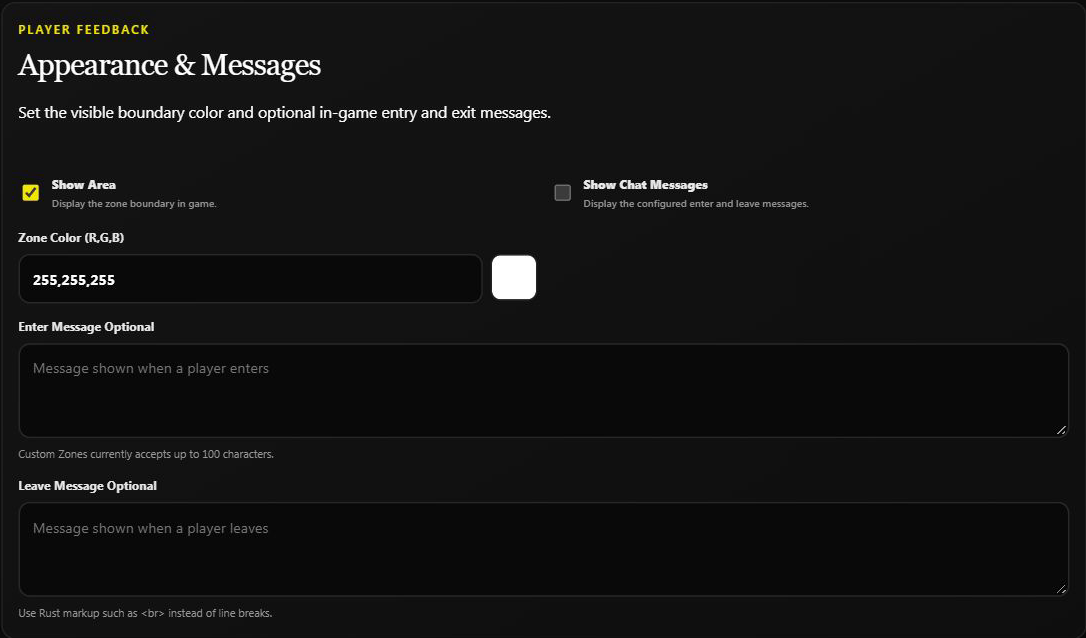
Enable Show Chat Messages as well as entering your messages. Dashboard messages accept up to 100 characters; use <br> rather than a literal line break. An entry message describes the rules but does not enable them.
TIPTurn Show Area on while you test
A zone with no visible outline is invisible to you as well as to your players. Leave Show Area on while you walk the boundary and confirm the size is right, then decide whether to keep it visible.
Manage All Zones
Click Manage All on the /zone panel to bulk-edit every non-ORP custom zone
at once. You can set Show Area, Color, Show Chat Message, Allow
PvP, Allow PvE, and Radiation across all zones — changes apply
immediately. Radiation opens a simple value box; use 0 to remove radiation
from every non-ORP zone.
The online dashboard also includes a Manage All Zones card for applying one radiation level across every non-ORP custom zone.
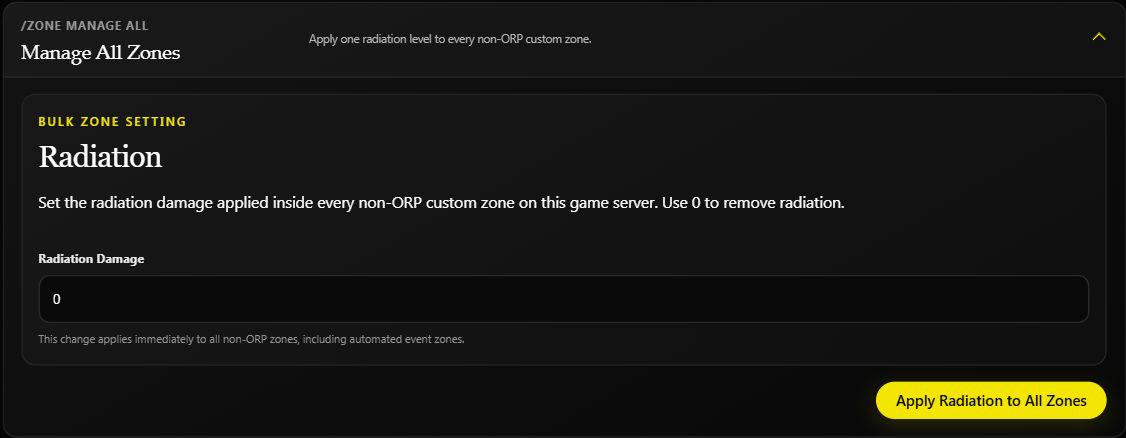
WARNBulk changes do not restore individual settings
Automated non-ORP zones are included. Mixed or unknown Discord toggles turn On on the first click. Record the original values before changing them: setting all zones back to Off does not restore each zone's previous rules. For one arena or trading area, edit that zone instead.
Validate Before You Announce It
First read the saved settings without changing anything. When someone is online, walk the boundary. Keep deliberate damage/building tests on a separate testing server rather than disturbing live players.
- Walk into the zone and confirm the enter message fires.
- Test the rule you actually care about — try to build in a no-build zone, or try to damage a teammate in a safe zone.
- Walk out and confirm the leave message fires.
- Check the outline is where you think it is, not offset by the shape's rotation.
Troubleshooting
| Problem | Likely cause | Fix |
|---|---|---|
/zone does not appear in Discord | Missing Manage Server permission | Zones are admin-only; check your Discord role |
| Zone rules do nothing | The zone was created somewhere else on the map | Re-check the captured position, or re-place it while standing inside |
| Zone is invisible in game | Show Area is off | Turn Show Area on and pick a color that contrasts with the terrain |
| Zones vanished after a wipe | Positions are map-specific | Re-check and re-place zones after every map wipe |
| Players still take damage in a safe zone | Allow PvP is still on, or the damage came from outside the boundary | Confirm the toggle, then check the zone is big enough to cover the whole area |
| Radiation applies where you did not want it | It was set through Manage All | Edit the affected zone and restore its intended value. Use bulk 0 only if every non-ORP zone should have no radiation. |
| Save says the zone changed | Another edit happened after you opened it | Refresh, review the latest values, and re-enter only your intended change. |
| Entry/exit text is saved but silent | Chat messages are off | Enable Show Chat Messages and check a normal boundary crossing. |
Frequently Asked Questions
Are zones free?
Yes. The /zone panel is on the free tier.
Do zones survive a wipe? Do not assume they survived. Check the live zone list after the wipe, then verify each position against the new map. A saved name in staff notes does not prove the zone still exists or is correctly placed.
How do I make a safe zone? Turn Allow PvP off and Allow Building off, leave Show Area on so players can see where it ends, and add an enter message explaining the rules.
How do I make a PvP arena on a PvE server? Create a zone with Allow PvP on and a clearly visible outline. Everywhere outside it keeps your server's normal rules.
Can zones overlap? They can be placed overlapping, but the result gets hard to reason about and hard for players to predict. Keep them separate unless you have a reason.
Sphere or Box? Sphere is easier for round areas like a monument or a trading post. Box, with rotation, fits rectangular areas like a road, a bridge, or an arena floor.
How many zones can I create? Keep the number manageable for your map and staff. The dashboard reads up to 500 editable zones; that is a display limit, not a promise that you can create unlimited zones or that the game server supports that many.
Are ORP zones the same thing? No. Offline raid protection zones are a separate premium system created by players around their own bases — see Offline Protection.
Related Guides
- How to Create and Use Zones — full walkthrough with examples.
- TP/Home & Zones hub
- Offline Protection — player-created ORP zones.
- Automation & Events — running scheduled events inside a zone.
Next Steps
- Create one zone and walk its boundary before creating any more.
- Publish your zone rules where players will read them.
- Add "re-check zones" to your wipe-day checklist.