Helios Rust Console Bot Documentation
Bounties
Set bounty rewards, automatic targets, announcements, and Discord feeds, then help players place and claim bounties.
- Last reviewed
- Tested on
- Helios Bot Testing dashboard
- Maintained by
- Helios RCE
Let players put a reward on a target and pay the hunter who takes them down. Use the dashboard to set sensible limits, schedule random targets, and keep an eye on active bounties. The dashboard module requires Premium on the selected server.
Set up player bounties
- Open the dashboard, choose Manage Server, then Bounties.
- Open Reward Limits and set the smallest and largest bounty players can place.
- Optionally choose a Discord channel under Bounty Feed.
- Choose Save Changes and wait for All Changes Saved.
- If the status is inactive, choose Turn On.
Example: rewards from 100 to 2,500
Set Minimum Reward to 100 and Maximum Reward to 2500. Bounties use your community's configured economy currency; the test server uses Bolts 🔩.
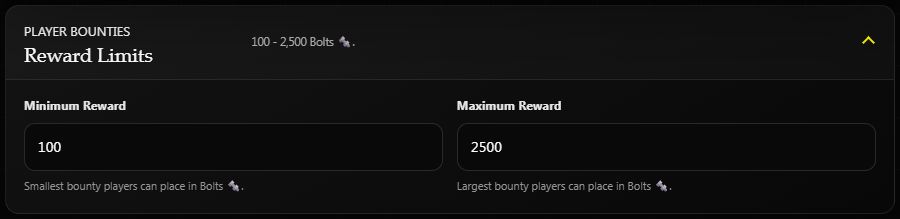
When a player places a 500-Bolt bounty, Helios takes 500 Bolts from their wallet. A linked hunter who makes a qualifying kill on the target receives the reward automatically. Self-kills and teammate kills do not qualify.
Bounties expire after 24 hours. Expiring or cancelling a bounty does not automatically refund the player who placed it, so make that rule clear to your community.
The target and claim belong to the game server chosen in /bounty. The currency comes from the player's community-wide Wallet; switching servers does not give them another balance. Safe Pocket funds are not spent automatically. Players can use Wallet and Payments to move funds before placing a bounty.
Add automatic targets
Open Random Bounties and set a separate reward range and interval. For example:
| Setting | Example |
|---|---|
| Minimum Reward | 100 |
| Maximum Reward | 500 |
| Frequency (Minutes) | 60 |
| Maximum Concurrent | 2 |
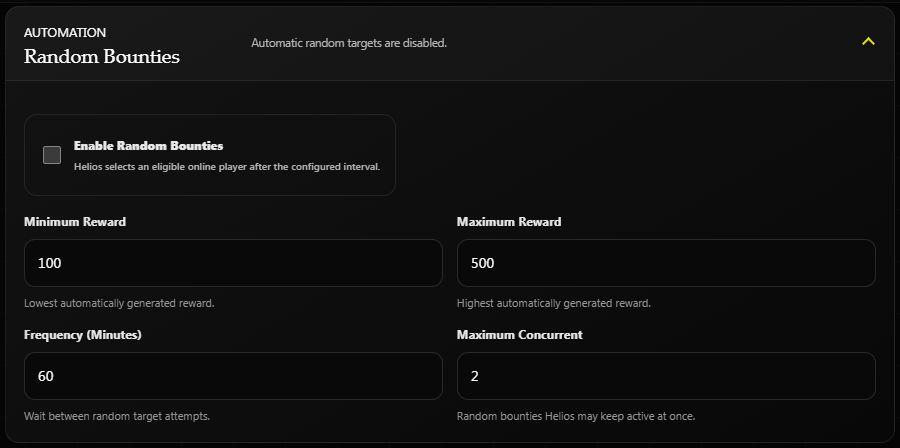
Saved settings on Helios Bot Testing. Automatic targets are disabled in this screenshot.
Check Enable Random Bounties, then Save Changes to start automatic target selection. Helios waits for the interval and looks for an eligible online player. The server must be connected; an empty server does not produce a target.
Only random bounties count toward the concurrent random bounty limit. With the example limit of 2, automatic target creation pauses while two random bounties are open. Random bounties are funded by Helios's bounty system rather than debited from a player's wallet.
Enable Random Bounty Reminders to repeat active random bounties in game chat at your chosen interval. Only online targets are announced, with their reward and nearest monument distance when available. Placement announcements also hide offline targets.
Cancel bounties on offline targets
In the dashboard, open Offline Cancellation, enable Cancel Bounties When Target Is Offline, and set Cancel After (Minutes Offline). In Discord, open /bounty and use Cancel Offline and Offline Minutes. These controls require Manage Server permission.
The option defaults to off. Choose a whole number from 1 to 10,080 minutes. For example, 1 cancels a bounty after Helios has observed the target offline for one minute, on the next check (normally every 30 seconds). This applies to both random and player-placed bounties on the selected server. Returning online resets the timer. Existing active bounties begin a fresh timer when you enable or change the option.
Server connection failures and unavailable player lists do not count as player logouts. After an observation gap longer than 90 seconds, Helios starts a fresh timer. A Discord target must still have a game-name link before Helios can determine whether they are offline.
Offline cancellation follows the existing cancellation policy: player-placed bounty payments are not automatically refunded. Cancelled bounties are removed from active targets and cannot be claimed.
Customize the announcement
Open In-Game Announcement and edit Bounty Message. Use these placeholders exactly:
[BOUNTY] {PlayerName} put {Amount} {Currency} on {VictimPlayerName}!
Example shown to players: [BOUNTY] Alex put 500 Bolts on Jordan! Rust colour markup is also supported. Choose Save Changes after editing.
Under Bounty Feed, choose a Discord channel for bounty starts, successful claims, and expirations. Leave it Disabled if you do not want those Discord posts.
How players place a bounty
- Run
/bounty server:"<SERVER>"in Discord. - Choose Set Bounty, then Gamertag or Discord User.
- Select the target and check the Confirm Bounty Target prompt.
- Choose Yes to open the reward amount form. This confirms the target, not the payment.
- Enter an amount within the limits. Submitting that form places the bounty and takes the amount from your Wallet.
For a read-only preview, stop before submitting the amount form. Viewing active targets or rankings does not place a bounty. Open your own /bounty panel rather than trying to use another player's controls.
Gamertag selection uses active players; Discord User selection requires a linked target. Players cannot place a bounty on themselves and must have enough currency in their wallet.
Hunters must link their game account using /link to receive payouts. If several active bounties match the same target, a qualifying kill can claim them together.
The hunter does not press a claim button. Helios matches the recorded game kill to the target on that server and pays the linked hunter's Wallet automatically. Unlinked hunters, self-kills, and teammate kills do not qualify.
Review and manage bounties
- Active Bounties: review open targets and rewards. Choose Cancel on a bounty, then Yes, Cancel Bounty to make it no longer claimable.
- Top Bounty Hunters: see the server's recorded bounty claims and rewards.
- Refresh: reload live data after saving any pending setting changes.
Discord's /bounty panel also has Active Bounties and Leaderboard. Members with Manage Server see the reward settings, random-bounty settings, message, feed, and removal controls.
If a bounty is not paid
Check the selected game server, the target's gamertag or linked Discord account, and the hunter's current /link. Confirm it was a player kill, not a self-kill, teammate kill, or non-player death. The bounty must still be active, not expired, cancelled, or already claimed.
Check the hunter's Wallet and recorded claim before issuing a replacement. Changing the reward limits or announcement text does not itself pay or refund an existing bounty.