Helios Rust Console Bot Documentation
Battle Pass Setup
Set up the Helios battle pass — reward levels, kits, items, chests, XP events, and feeds.
- Last reviewed
- Maintained by
- Helios RCE
Overview
The Helios battle pass gives players rewards as they level up. Players earn XP by playing, view progress with /bp, and complete /challenges. Admins build the reward track with /level.
Build rewards in the dashboard
Open Manage Server → Battle Pass. Expand Level Rewards to see the saved track, or choose Create Reward.
- Choose a Level from 1–200 and a Reward type.
- Give it a player-friendly Reward name.
- Select the actual kit, item, command group, chest, key, role, or coin amount.
- Tick Premium reward only if this reward should require your community's premium Battle Pass role.
- Save, then check the reward under Level Rewards.
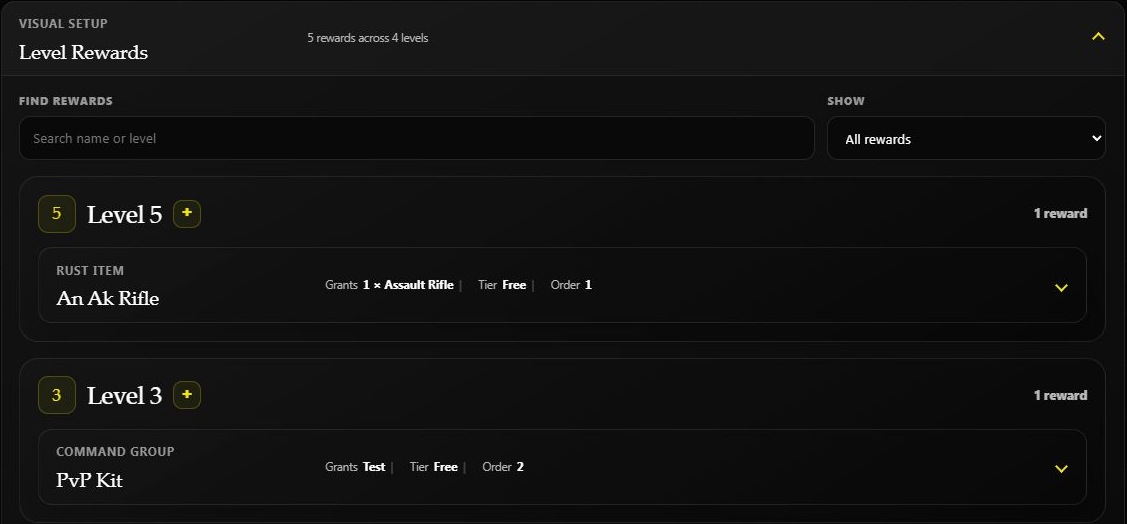
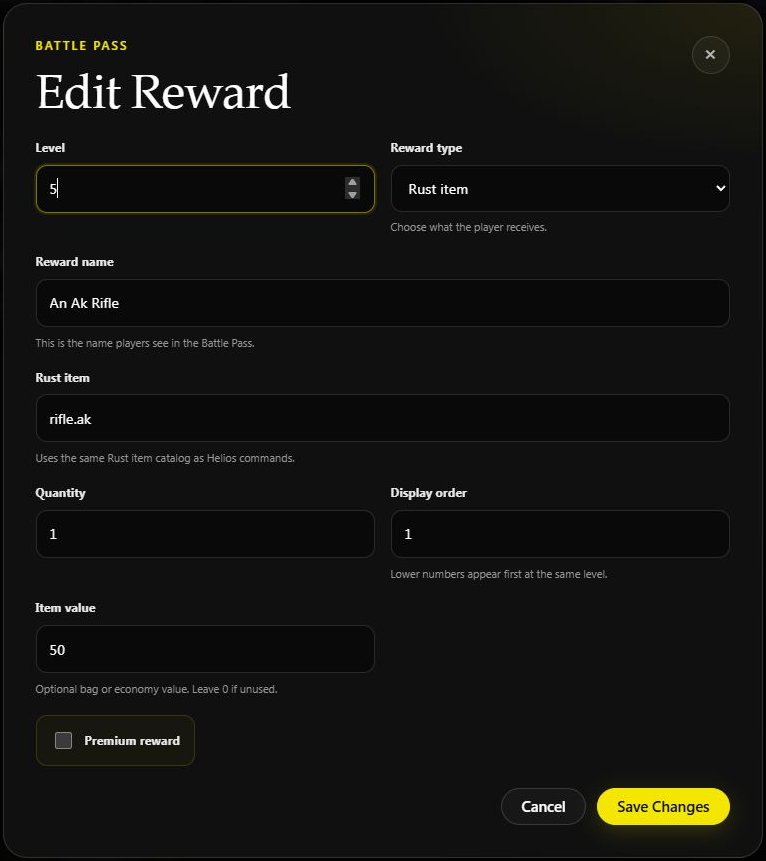
This saved test reward gives one Assault Rifle at level 5. Its friendly name is separate from the item shortname, rifle.ak. Opening Edit does not change the reward.
Server Premium unlocks Helios features. The premium Battle Pass role controls which players can claim premium-track rewards; configure that role with /set premium-role.
Set XP and challenges
Set Player Kill XP and PvE Kill XP in their own cards, then use each card's Save button.
Expand Challenges → Create Challenge to add an objective, its target and XP reward. Review built-in goals separately from custom challenges; use the filters to find paused or active goals. These choices apply across the Discord community, not only the game server open in the dashboard. Custom changes can take about a minute to reach players.
See Battle Pass Challenges for the goal types, daily versus wipe-long progress, category controls, and a step-by-step custom example.
For example, start with a small tracked-kill objective and a modest XP reward, then check it with /challenges.
Schedule bonus XP
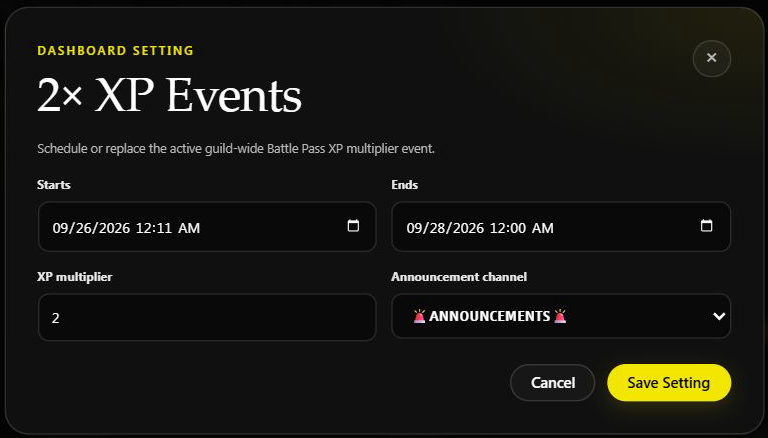
Expand 2× XP Events to choose exact start and end dates, a multiplier, and an optional announcement channel. Enter 2 for double XP and choose Save XP Event. Start Now only fills in the start time; it does not save on its own.
The event is shared by this Discord community's connected game servers. Saving replaces the community's existing event. For an event ending Sunday night, choose Monday at 12:00 AM and check the timezone shown in the card.
See Battle Pass XP Events for the Overview shortcut, Discord's relative-time command, real announcement example, and troubleshooting.
Set up level-up announcements
Expand In-Game Level-Up Announcements in the dashboard to choose On or Off and edit the message. Keep {PlayerName} and {Level} in the text for Helios to fill in those details, then choose Save Announcements.
Use /bpfeed to choose Discord level-up channels. The Discord destinations and in-game switch are separate, and neither is set by choosing an XP-event announcement channel. See Battle Pass Feed for the full walkthrough.
Check a player's reward
Ask a linked player to open /bp, reach the required level, and claim the reward. Check /bag for rewards delivered there. If a claim fails, check the required role, available bag space, and that the referenced kit or reward still exists before granting a replacement.
Battle Pass Progress
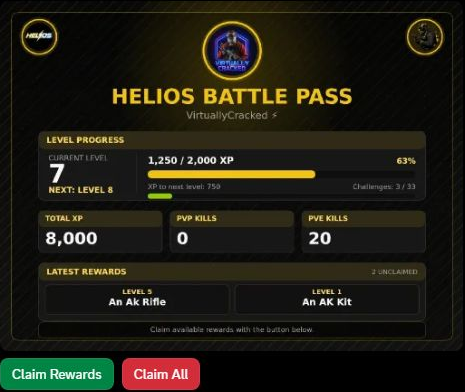
Run /bp to view the current level, XP progress, PvP and PvE kills, recent rewards, and unclaimed rewards.
Compare progress without claiming anything
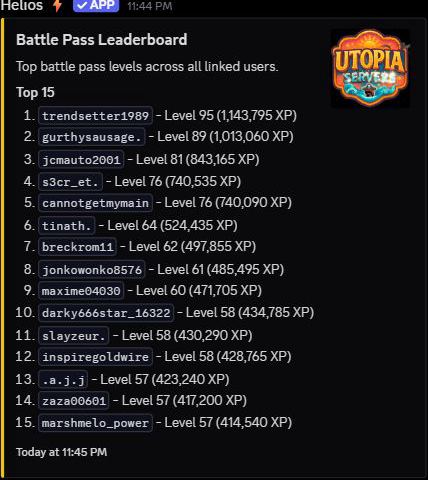
Run /lb battle-pass to view the top 15 linked players in this community, ranked by level and then total XP. It is community-wide, even when run in a Bedwars channel. The list has no reward-claim step and can be viewed while you are offline in Rust.
On your personal /bp result, Claim Rewards and Claim All are actions, not preview buttons. Leave them untouched when you only want to check progress. See Leaderboards for the different ranking scopes.
Player Challenges
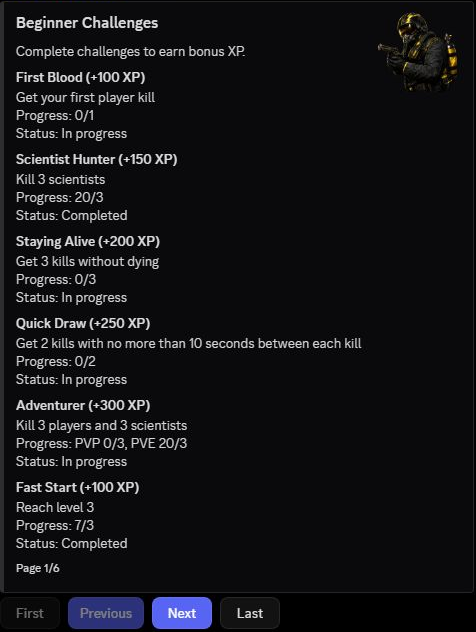
Run /challenges to view challenge requirements, progress, completion status, and bonus XP.
Video Tutorial
Setup Flow
- Enable Battle Pass in
/settings server. - Add rewards to levels with
/level add(oradd-kit,add-item,add-cmd,add-treasure). - Optionally set a premium role with
/set premium-rolefor premium-only rewards. - Set up level-up announcements with
/bpfeed. - Check progress with
/bpand/level list.
Admin Commands
| Command | What It Does |
|---|---|
/level add | Add a reward (coins, command, role, collectible, key, or chest) to a level |
/level add-kit | Add a kit reward to a level |
/level add-item | Add a Rust item reward to a level |
/level add-cmd | Add a command-group reward to a level (Premium) |
/level add-treasure | Add a chest or key reward to a level (Premium) |
/level edit | Edit a reward |
/level edit-kit / edit-item / edit-cmd / edit-treasure | Edit those reward types |
/level list | List rewards (players can run this too — no Manage Server needed) |
/level details | View the rewards configured for a level |
/level remove | Remove rewards from a level |
/set premium-role | Role required for premium battle pass rewards |
/set 2xp | Schedule a temporary XP multiplier event |
/product add-xp / /product edit-xp | Create or edit timed personal XP multiplier products |
/bpfeed | Manage battle pass feed channels and in-game level-up messages |
/give xp / /take xp | Adjust a player's battle pass XP |
/wipe battle-pass | Reset battle pass progress and challenges |
Player Commands
| Command | What It Does |
|---|---|
/bp | View battle pass progress |
/challenges | View battle pass challenges |
/level list | View the configured reward track |
Examples
/level add level:5 name:"500 Coins" type:Coins value:500 premium:No
/level add-kit level:10 kit:"pvp" name:"PvP Kit" premium:Yes
/level add-item level:3 item:"wood" name:"5k Wood" quantity:5000 premium:No
Notes
- Each level can hold multiple rewards; use
positionto control their order. - Mark rewards
premium:Yesto lock them behind the/set premium-rolerole. - Levels go from 1 to 200.
- Use
/set 2xpfor double (or higher) XP weekends. - Personal
2xand community2xgive a player4xearned kill, challenge, and playtime XP. Direct staff XP adjustments are not multiplied. Using another personal boost replaces its current multiplier and end time instead of extending it. - See Personal XP Boost Products for shop, bag, and Tip4Serv setup.