Helios Rust Console Bot Documentation
Random Items and Kits
Give online players automatic item or kit drops, choose the reward pool, and set the schedule.
- Last reviewed
- Maintained by
- Helios RCE
Overview
Random Items and Random Kits are Premium features that automatically give rewards to online players on the selected game server. Players do not sign up, wait for a winner draw, or claim these drops from /bag.
Pick the right reward type
Random Items gives individual items from the Rust item catalog. Random Kits gives one of your saved server kits. They are separate features with separate schedules, so you can use either one or run both.
Open Random on the selected game server in the dashboard, or use the matching Discord command below.
Random Items
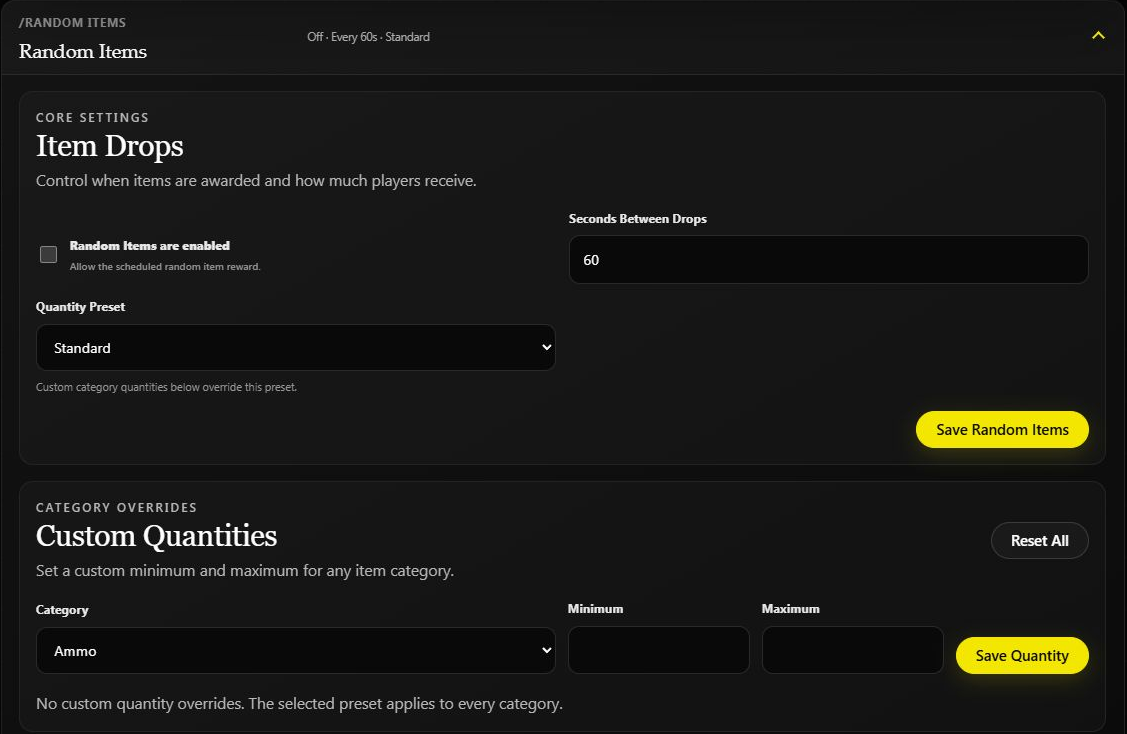
Set Seconds Between Drops, choose a Quantity Preset, enable the feature, and click Save Random Items. The screenshot shows the feature off with a 60-second interval saved.
Use Custom Quantities for a category-specific minimum and maximum. Those values override the preset for that category. Use Custom Category Items to restrict a category to selected catalog items. Review exclusions before enabling the drops.
Configure Random Items in Discord
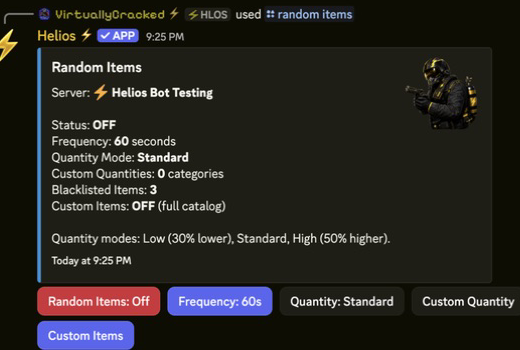
Run /random items server:"<SERVER>" to open the Discord panel. It has the same main choices in one place:
- Random Items On/Off starts or stops drops without deleting your choices.
- Frequency is the number of seconds between drops. Helios accepts 10 seconds through 24 hours.
- Quantity switches between Low (30% less), Standard, and High (50% more).
- Custom Quantity lets you set a minimum and maximum for a specific item group.
- Black List prevents named Rust item shortnames, such as
rifle.ak, from dropping. - Custom Items limits drops to the items you tick. If no custom items are selected, Helios uses the full catalog.
Random Kits
The dashboard calls this section Kit Giveaways, but it works as an automatic drop for each eligible online player, not a single-winner giveaway.
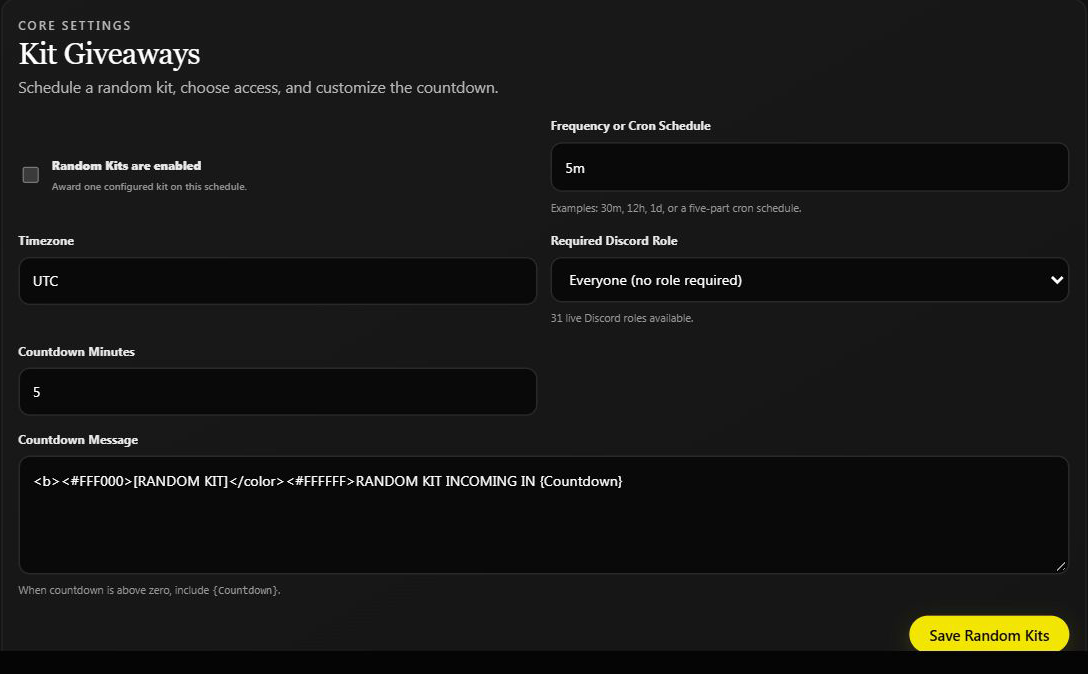
Open Random Kits and configure:
- Frequency or Cron Schedule, such as
30m,12h, or1d. - Timezone and an optional Required Discord Role.
- Countdown Minutes and a countdown message containing
{Countdown}when the countdown is enabled. - Kit Pool: select actual kits found on this game server; use Refresh Kits after adding new ones.
Keep at least one valid kit in the pool before enabling the feature and clicking Save Random Kits. Viewing the form does not start drops.
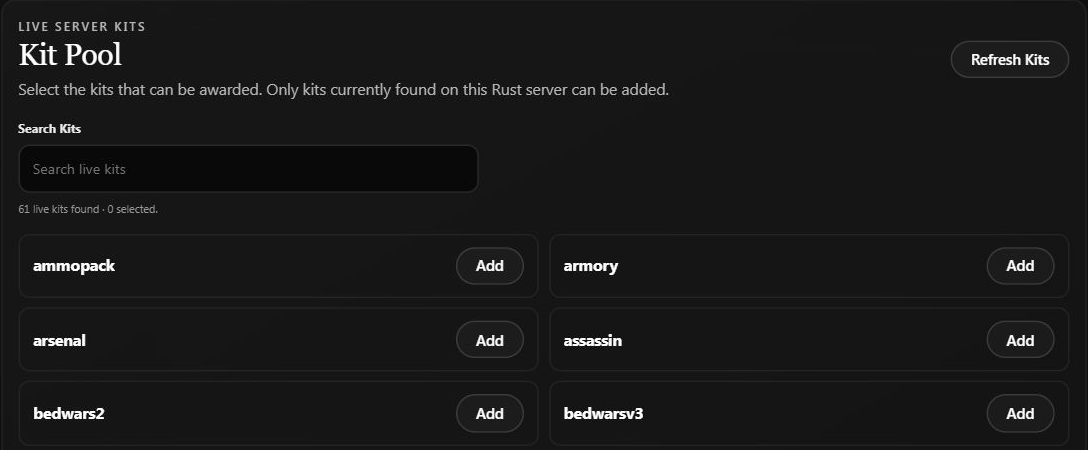
Search for an existing kit and use Add to include it. Refresh Kits reloads the server's kit list; it does not create a kit. The screenshot shows 61 available kits but 0 selected, so this pool is not ready to award anything.
What players receive
At each drop, Helios chooses a kit separately for every eligible online player and sends it directly in game. Players may receive different kits from the same pool. There is no signup emote, winner list, bag item, or later claim button.
With Everyone (no role required), a Discord link is not needed for Random Kits. If you choose a specific Discord role, players need a linked game account and that role in your Discord. An unlinked player or someone without the role is skipped. Random Items does not use this kit-role restriction.
The countdown is only a warning before delivery. Keep {Countdown} in the message when using a countdown; it is not an instruction to enter or claim. For entry-based prizes, use Auto In-Game Giveaways instead.
Configure Random Kits in Discord
Run /random kits server:"<SERVER>". Choose Kits to build the prize pool and Frequency to set the timing. Timing can be a simple delay such as 30m, 5h, 1d, or 30s; advanced owners can use a five-part cron schedule. Pick a timezone before saving a calendar-style schedule.
Use Countdown Message to warn players before the next kit drop. The message can include {Countdown}. The optional role selector means only players with that Discord role can receive a random kit. Turn Random Kits on only after saving a kit pool and testing it with a linked player.
Video Tutorial
Requirements
- Premium active on the target server
- Connected server with active online players
Manage Serverpermission for configuration
Setup
- Open
/random items server:"<SERVER>". - Set frequency in seconds.
- Set quantity mode (
low,standard,high) and any exclusions. - Check the reward size before turning the feature on.
- When ready, enable drops and monitor the first scheduled delivery on a testing server.
Commands or Controls
/random items server:"<SERVER>"
/random kits server:"<SERVER>"
Example Use Case
Owner sets random items to standard at 120-second frequency during low-pop hours, then switches to low mode during peak hours.
Common Issues
Kits are not arriving
Check that Random Kits is enabled, the server is connected and Premium, someone is online, and the pool contains a valid kit. If a role is required, check the player's /link and Discord role. A countdown alone does not prove delivery. Also check that the actual kit still exists on this server.
Drops are for players online when they run. Do not promise offline players a saved bag reward or later claim.
Problem
Random items stop running unexpectedly.
Likely Cause
Premium became inactive, and the module auto-disabled.
Fix
Restore premium for the server and re-enable random items in the panel.
Prevention
Track premium status changes in owner audit notes.
Tips / Best Practices
- Random Item frequency is constrained to 10 seconds through 24 hours.
- Quantity mode impacts item amount:
low(-30%),standard,high(+50%). - Start conservative, then adjust after observing economy impact.