Helios Rust Console Bot Documentation
Rust Console Economy and Rewards Setup Guide
Rust Console economy policy, payout tuning, and battle pass reward governance for Helios server owners and admins.
- Last reviewed
- Maintained by
- Helios RCE
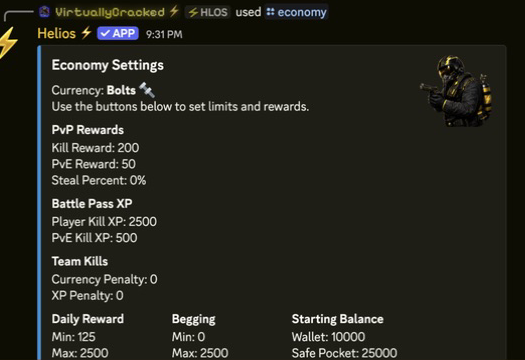
Overview
Use this hub to choose payouts, set player balances, and connect your economy to Battle Pass rewards. Helios currency is shared by the Discord community; it is not a separate wallet for each Rust server.
Video Tutorial
Requirements
- Linked accounts for player wallet actions
- Economy module enabled
- Battle pass module enabled if rewards are in use
- Premium active for premium-gated economy commands
Setup
- Choose the currency name. This changes the label, not player balances or actual Rust items.
- Tune payouts, penalties, starting balances and role-based playtime rewards in Economy Settings.
- Set Casino Games limits separately from the reward amounts.
- Configure rewards and the premium Battle Pass role in Battle Pass Setup.
- Set up Daily Login Rewards if you want a return-player streak. These are separate from Daily Coins.
- Verify changes in a testing community before rollout. Do not grant rewards or reset real players merely to get a screenshot.
Three changes that mean different things
For the player side, see Wallet, Safe Pocket and Payments. For staff support, see Giving Rewards and Taking Currency and XP. A grant adds money, a take subtracts it, and Set Player Balances replaces a total.
| Control | What changes |
|---|---|
| Currency Name | The label shown beside the money; amounts stay the same |
| Starting Balance | The allowance for new links without an existing economy account |
Player Balances or /set bank | A current player's selected Wallet or Safe Pocket is replaced with an exact total |
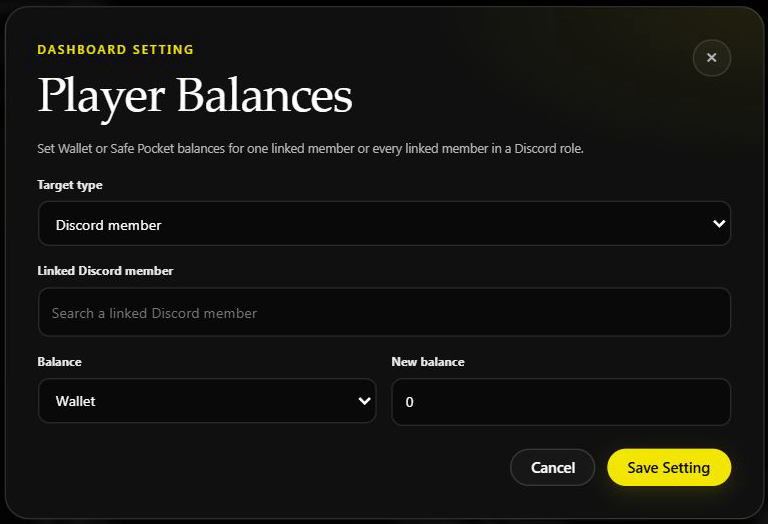
Use Set Player Balances carefully: a role target changes every linked member in that role. Setting 500 does not add 500 to what they already have.
Playtime payouts are automatic, role-based, and use the chosen interval in minutes. They are not a daily claim. XP boosts can increase playtime XP but not the currency payout.
Spend and trade without confusing the systems
Build owner products with Shop & Market Setup, then use Dynamic Shop Pricing only if you want demand to change their prices on selected game servers. That price rule does not change Wallet balances or player Market asking prices.
Player Market moves saved bag items between players and pays the seller only when someone buys. The trader is a separate immediate sell-back option. Check those different paths before using either as a currency sink in your economy plan.
Commands or Controls
/economy
/set currency
/give money
/take money
/bank
/deposit
/withdraw
/level add
/bp
/challenges
Example Use Case
/set currency name:"Scrap"
/economy
/level add level:5 name:"Starter Scrap" type:coins premium:no value:500